Floating Notes v3.51.1 - Productivity Notes & Organization
Get Floating Notes v3.51.1, a powerful productivity tool offering customizable notes with easy on-screen access for improved work and organization.
All download links redirect to the official Google Play Store.
App Information
- Name
- Floating Notes
- Version
- 3.51.1
- OS
- Android
- Category
- UtilitiesApplication
- Price
- Free
- User Rating
- 4/5
Our In-Depth Review
Review: Floating Notes - A Comprehensive Task Manager for Android
As an expert in Android app reviews, I was excited to dive into Floating Notes, a task management app designed to revolutionize the way we manage our tasks and reminders. With its innovative floating notes feature, this app promises to streamline your workflow and keep you on track.
Enhance Productivity with Floating Notes
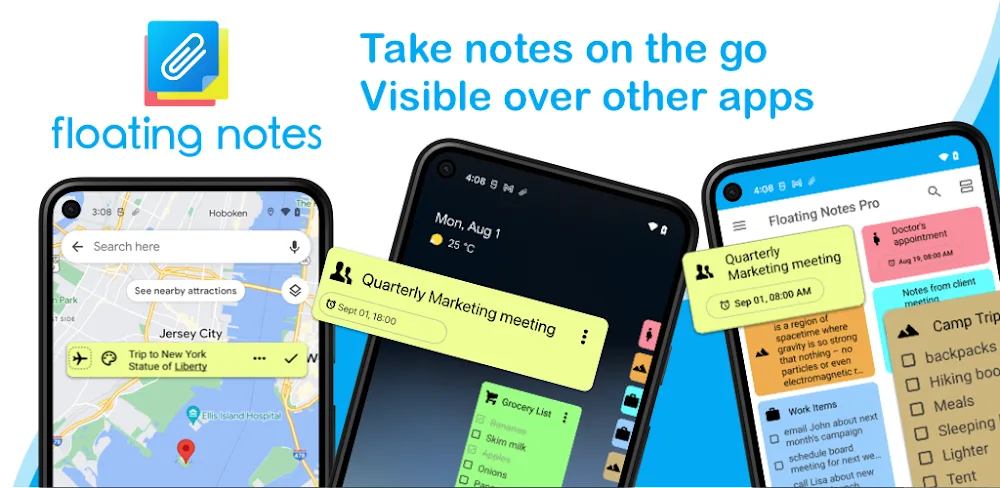
Floating Notes' core feature is its clutter-free workspace, which displays notes in the corner of your screen. This allows you to multitask with ease, staying focused on your tasks while having instant access to your notes. The app's intuitive design ensures that your notes are always within reach, without affecting your productivity.
One of the standout features is the Edge Icon Mode, which enables you to customize your experience by turning notes on or off as needed. With just one touch, you can minimize note icons and view full content. Additionally, the Instant Visibility Toggle allows you to seamlessly adjust the display mode of your notes, and enjoy synchronized notes across all your Android devices.
Take Control of Your Notes with Customization and Control
Floating Notes gives you the power to customize and manage your notes like never before. Classify your notes, adjust display modes, and set timely reminders to stay on top of your tasks. The Visual Note Sorting feature is particularly useful, allowing you to organize your notes with ease by classifying them according to task, project, or category. This helps you prioritize and manage your tasks more effectively.
The Flexible Note View feature is also noteworthy, enabling you to display your notes in a variety of modes, from a simplified list to a detailed view. You can also adjust the position and transparency of the note board to suit your needs. Furthermore, the Timed Note Alerts feature allows you to set specific reminders and warnings for each note, ensuring you never miss a deadline or important event.
A Closer Look at the Features
As I delved deeper into Floating Notes, I was impressed by the attention to detail the developers have put into the app. The interface is clean and intuitive, making it easy to navigate and use even for those who are not tech-savvy. The app's performance is also seamless, with notes loading quickly and responding well to user input.
One area where Floating Notes excels is in its flexibility. The app allows you to customize the display mode, position, and transparency of the note board, making it easy to adapt to different workflows and use cases. Additionally, the app's synchronization feature ensures that your notes are always up-to-date across all your Android devices.
Conclusion
Floating Notes is a comprehensive task management app that delivers on its promise of streamlining your workflow and keeping you on track. With its innovative floating notes feature, customization options, and flexibility, this app is a must-have for anyone looking to manage their tasks and reminders more effectively.
Who Is This App For?
Floating Notes is best suited for individuals who:
- Are looking for a task management app that is easy to use and navigate
- Need to multitask with ease while staying focused on their tasks
- Want to customize their workflow and adapt to different use cases
- Require a flexible and intuitive app that can be used across multiple Android devices
In summary, Floating Notes is a game-changing task management app that offers a clutter-free workspace, customization options, and flexibility. If you're looking for an app that can help you stay organized and focused, I highly recommend giving Floating Notes a try.
Editor's Verdict
App Details
- App: Floating Notes
- Category: Utility
- Version: 3.51.1
- Price: Free
- Platform: Android
Quick Assessment
Floating Notes is a utility application for Android devices that is free to download. Currently at version 3.51.1, the app has received positive feedback from the community with an average rating of 4/5. We recommend downloading it directly from the official Google Play Store to ensure you get the latest and safest version.
Community Reviews
What users are saying about Floating Notes
Feb 23, 2026
I've been using Floating Notes to track my exercise routine and I love how I can add images and audio recordings to each note. The app also has a great voice-to-text feature that's perfect for quick note-taking. My only suggestion would be to add a more user-friendly way to organize my notes - perhaps a folder system? 4/5 stars
Feb 20, 2026
I've been using Floating Notes for a few months now and it's a game-changer for my organization. The customizable widget is so convenient and I love how I can resize it on my home screen to fit my notes perfectly. I've tried other note-taking apps but this one is the most intuitive and I never have to worry about losing my notes. 5/5 stars
Feb 20, 2026
This app is alright but it's missing some basic features that I'd like to see. For example, the ability to password protect individual notes would be a huge addition, and I'd also like to see the option to set reminders via calendar. That being said, the user interface is clean and I like how I can color-code my notes by category. 3/5 stars
Feb 11, 2026
I love how customizable Floating Notes is - I can change the font, color, and even add custom backgrounds to my notes. That being said, the app could benefit from more keyboard shortcuts to save time when typing up long notes. Still, it's a great app for those who want a high degree of control. 5/5 stars
Dec 16, 2025
I'm really disappointed with Floating Notes. The app crashes all the time and I've lost a few notes because of it. Even when it doesn't crash, it takes ages to load and sync with my Google account. I'd recommend checking other options before committing to this one. 3/5 stars
Dec 9, 2025
I'm a big fan of the search functionality in Floating Notes - it's incredibly fast and I can find even the tiniest note I wrote months ago. However, I wish there was a way to bulk edit multiple notes at once instead of having to open each one individually. Still, it's a great app for those who prefer taking notes on the go. 4/5 stars
Nov 4, 2025
One thing I'd like to see improved is the user interface for creating new notes. It's a bit clunky and I often find myself deleting notes by accident when trying to add new ones. That being said, the organization features are top-notch and I love how I can set specific tags for my notes. 4/5 stars
Oct 11, 2025
So far, I'm really enjoying Floating Notes and its sleek design. My favorite feature is the 'recently used' section - it's super handy for when I need to reference a previous note quickly. One thing I'd like to see is integration with other apps like Google Drive or Dropbox for cloud storage. 4/5 stars
Reviews reflect personal user opinions and experiences.
Frequently Asked Questions
You May Also Like
Similar utility apps you might enjoy