Flowdia Diagrams v1.17.2 - Flowcharts, Diagrams & Network Maps
Discover Flowdia Diagrams, a powerful tool for creating professional flowcharts, diagrams, and network maps. With its user-friendly interface, organize your work, visualize ideas, and communicate effectively.
All download links redirect to the official Google Play Store.
App Information
- Name
- Flowdia Diagrams
- Version
- 1.17.2
- OS
- Android
- Category
- UtilitiesApplication
- Price
- Free
- User Rating
- 4.1/5
Our In-Depth Review
Streamlining Your Workflow with Flowdia Diagrams
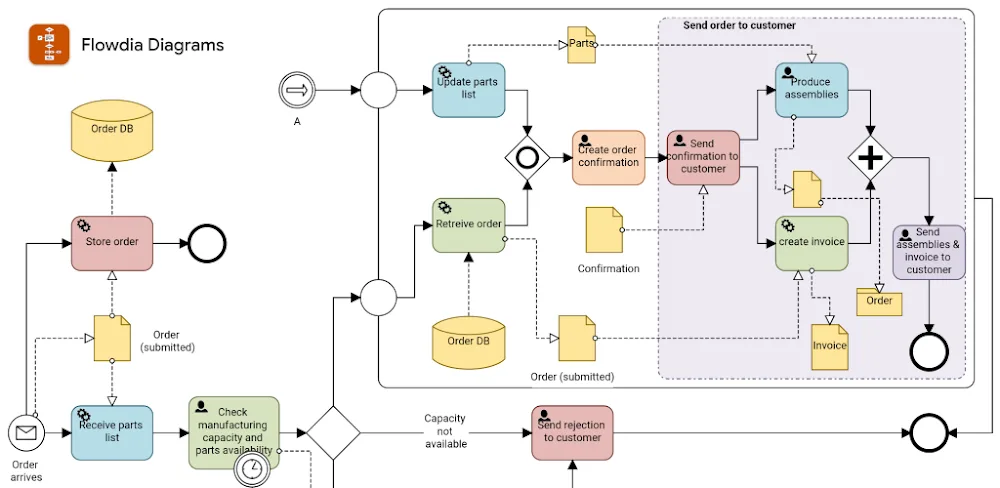
In today's fast-paced world, staying organized and productive is crucial. With numerous tasks and responsibilities to juggle, it's easy to feel overwhelmed and unsure of where to start. This is where flowcharts come in – a powerful tool for visualizing information and streamlining your workflow. Flowdia Diagrams is a user-friendly app that makes creating flowcharts a breeze.
Effortless Diagram Creation
Flowdia Diagrams is designed to be intuitive and easy to use, even for those without extensive experience in diagram creation. With a simple and straightforward interface, you can bring your ideas to life with minimal effort. The app's features are designed to facilitate creativity and productivity, saving you time and reducing stress. One of the standout features of Flowdia Diagrams is its ability to automatically arrange elements, saving you the hassle of manual alignment. This feature, coupled with the app's drag-and-drop functionality, makes creating complex diagrams a relatively simple process.
Key Features for Enhanced Productivity
Flowdia Diagrams offers several key features that set it apart from other diagram creation apps:
Versatility and Customization
Flowdia Diagrams is an incredibly versatile app that allows you to create a wide range of chart formats, each with its own unique benefits. Whether you need to communicate complex information or simply create a visual representation of your workflow, this app has got you covered.
- Wide Range of Chart Formats: Flowdia Diagrams supports numerous types of charts, including circuit diagrams, flowcharts, and more. The app also includes a range of pre-designed templates to get you started quickly.
- Customizable Sendout Groups: The app allows you to create and send out groups with various designs, perfect for sharing with colleagues or clients. This feature is particularly useful for team collaboration and presentations.
- Customizable Shape Aesthetics: With Flowdia Diagrams, you can modify your shapes to suit your needs, ensuring consistency and coherence in your diagrams. The app includes a range of shape styles and colors to choose from.
Collaboration and Integration
Flowdia Diagrams also includes features that facilitate collaboration and integration with other tools. For example, you can export your diagrams as PDF, PNG, or JPEG files, making it easy to share them with others. The app also allows you to import diagrams from other sources, such as Google Drawings or Microsoft Visio.
Pros and Cons
While Flowdia Diagrams is an excellent app for creating flowcharts, there are some areas for improvement. One notable feature missing from the app is the ability to insert images or videos directly into diagrams. This can be a limitation for users who need to include multimedia content in their diagrams. Additionally, the app's lack of real-time collaboration features can make it difficult to work with others in real-time.
Who Is This App For?
Flowdia Diagrams is an excellent choice for anyone who needs to create flowcharts or diagrams as part of their work or personal projects. The app is particularly useful for:
- Project managers who need to visualize workflows and communicate with team members
- Business owners who need to create diagrams for presentations or reports
- Students who need to create diagrams for assignments or projects
- Anyone who wants to streamline their workflow and improve productivity
Overall, Flowdia Diagrams is a user-friendly and versatile app that makes creating flowcharts a breeze. While there are some areas for improvement, the app's strengths far outweigh its weaknesses, making it an excellent choice for anyone who needs to create diagrams as part of their work or personal projects.
Editor's Verdict
App Details
- App: Flowdia Diagrams
- Category: Utility
- Version: 1.17.2
- Price: Free
- Platform: Android
Quick Assessment
Flowdia Diagrams is a utility application for Android devices that is free to download. Currently at version 1.17.2, the app has received positive feedback from the community with an average rating of 4.1/5. We recommend downloading it directly from the official Google Play Store to ensure you get the latest and safest version.
Community Reviews
What users are saying about Flowdia Diagrams
Feb 22, 2026
I love how easy it is to create complex flowcharts and diagrams with Flowdia Diagrams. The drag-and-drop feature makes it perfect for those who are new to diagram-making like me. However, I wish there were more templates to help beginners get started. 4/5 stars.
Feb 13, 2026
I'm a big fan of the app's export options, especially the PNG and PDF export, but I wish there were more options for sharing my diagrams, like direct share to social media or messaging apps. Maybe in the future? 4/5 stars.
Feb 6, 2026
I recently purchased the premium version, and I'm really liking the new features, like the advanced shape library and the ability to add videos to my diagrams. The only thing I'd like to see is the option to undo changes made in bulk, which would be super helpful when working on large projects. 5/5 stars.
Feb 6, 2026
I've been using Flowdia Diagrams for work and school projects, and it's been a lifesaver. The collaboration feature is super helpful when working with a team, and the app is very responsive and fast. Keep up the good work! 5/5 stars.
Feb 1, 2026
I've tried several other diagram-making apps, but Flowdia Diagrams is my favorite because of its ease of use and seamless integration with Google Drive. The only thing I'd like to see is the ability to create custom shapes from scratch - that would be a game-changer for designers. 5/5 stars.
Dec 4, 2025
I don't understand why the app has a 'save as draft' feature but no option to automatically save changes as you go. It's frustrating when you have to manually save every single change, especially when working on a large diagram. 3/5 stars.
Sep 29, 2025
I've been using Flowdia Diagrams for a year now, and it's one of the best diagram-making apps I've ever used. The user interface is very intuitive, and the export options are great, but sometimes the app freezes when I'm working with large diagrams. 4/5 stars.
Sep 27, 2025
I'm not sure about this app yet. I like the basic features like text boxes and arrows, but the free version has some major limitations, like limited export options and no collaboration features. Maybe I'll upgrade to the premium version soon, we'll see. 3/5 stars.
Reviews reflect personal user opinions and experiences.
Frequently Asked Questions
You May Also Like
Similar utility apps you might enjoy