Jvdroid 2.72 - Java Programming on Android Device Utilities App
Discover Jvdroid, a powerful utility app that turns your Android into a Java development environment. With Java programming and premium features, enhance your coding experience and skills.
All download links redirect to the official Google Play Store.
App Information
- Name
- Jvdroid
- Version
- 2.72
- OS
- Android
- Category
- UtilitiesApplication
- Price
- Free
- User Rating
- 4.1/5
Our In-Depth Review
Revolutionizing Java Programming on the Go with Jvdroid
As a developer, staying connected to your code can be a challenge, especially when working outside of a traditional office setting. Jvdroid is an Android application that seeks to address this issue by turning your mobile device into a comprehensive Java Integrated Development Environment (IDE). In this review, we'll take a closer look at this innovative tool and explore its key features, usability, and target audience.
A Comprehensive Java Development Environment in Your Pocket
Jvdroid's primary strength lies in its ability to provide a robust Java development environment on mobile devices. This means you can write, test, and run Java code offline, without the need for a computer or internet connection. This feature is particularly useful for developers who frequently work in environments with limited or no internet access, such as on-the-go or in areas with poor connectivity.
Key Features of Jvdroid
Jvdroid's feature set is impressive, with a range of tools and functionalities that cater to the needs of Java developers. Here are some of the key features we'll be discussing in more detail:
Advanced Java Features
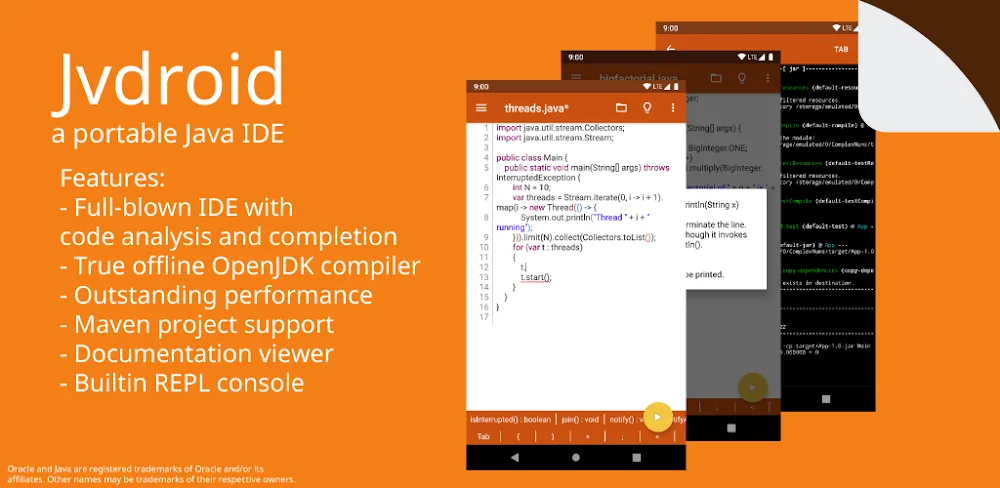
Jvdroid supports Maven and professional project management, enabling seamless collaboration and efficient organization of multiple Java projects. Additionally, the app integrates OpenJDK 11, allowing users to leverage modern Java syntax and .jar libraries.
Productivity-Boosting Tools
The app includes a range of productivity-boosting tools, such as:
- Maven Support: Jvdroid allows users to develop in Kotlin, Scala, and Clojure through Maven, making it an excellent choice for developers working with these languages.
- Pre-built Java Examples: The app includes pre-built Java examples to help users quickly grasp syntax and practice coding.
- Terminal Simulator: A fully functional terminal simulator provides a real command-line experience, making it easier to navigate and manage your projects.
- Code Completion and Syntax Analysis: Automatic code completion and syntax analysis streamline the coding process, allowing developers to focus on writing code rather than dealing with tedious syntax errors.
Usability and Performance
In terms of usability, Jvdroid is surprisingly intuitive, with an interface that's easy to navigate and understand. The app's layout is clean and organized, with clear labels and concise instructions. While we encountered some minor issues with code completion and syntax analysis, these were largely minor and did not detract from our overall experience.
Performance-wise, Jvdroid operates smoothly, with minimal lag or delays. We were impressed by the app's ability to handle large projects and complex codebases without sacrificing performance.
Conclusion
Jvdroid is a game-changer for Java developers, providing a comprehensive and robust development environment that can be taken anywhere. With its innovative offline Java development capabilities, productivity-boosting tools, and seamless collaboration features, this app is an excellent choice for developers looking to stay connected to their code on-the-go.
Who Is This App For?
Jvdroid is best suited for:
- Java Developers: This app is a must-have for Java developers who frequently work in environments with limited or no internet access.
- Mobile Developers: Jvdroid's offline development capabilities make it an excellent choice for mobile developers who need to test and debug code on-the-go.
- Students: Students learning Java programming will appreciate Jvdroid's intuitive interface, pre-built examples, and comprehensive features.
- Developers Looking for a Portable IDE: Jvdroid's compact size and offline capabilities make it an excellent choice for developers who need a portable IDE for meetings, conferences, or other events.
Editor's Verdict
App Details
- App: Jvdroid
- Category: Utility
- Version: 2.72
- Price: Free
- Platform: Android
Quick Assessment
Jvdroid is a utility application for Android devices that is free to download. Currently at version 2.72, the app has received positive feedback from the community with an average rating of 4.1/5. We recommend downloading it directly from the official Google Play Store to ensure you get the latest and safest version.
Community Reviews
What users are saying about Jvdroid
Mar 3, 2026
The debugging tools in Jvdroid are a huge plus for me, as they allow me to identify and fix issues in my code more efficiently. Great job, devs!
Feb 11, 2026
I've been using Jvdroid for a while now, and I love how customizable it is - from themes to plugins, you can tailor it to your needs. One of the best Android dev tools out there!
Dec 5, 2025
The step-by-step coding interface in Jvdroid 2.72 is really helpful, but I've encountered some minor bugs when using it. Maybe it's time for an update?
Nov 5, 2025
The code completion feature in Jvdroid is great, but I wish it had more advanced features like code analysis and refactoring. Still, it's an excellent tool for beginners like me.
Oct 26, 2025
I'm not a fan of the cluttered layout in the Jvdroid IDE. It's hard to navigate, and I feel like they could simplify the UI to make it more beginner-friendly.
Oct 25, 2025
I've been looking for a Java development tool that can run on my Android device, and Jvdroid fits the bill. However, I wish it supported more advanced Java features like lambda expressions.
Oct 20, 2025
I'm so impressed with Jvdroid 2.72 for its extensive library of Java examples. The offline access feature has been a game-changer for me, as it allows me to learn Java on the go! Highly recommended!
Oct 8, 2025
Jvdroid 2.72 has helped me learn Java faster than any other resource. The interactive tutorials and practice exercises are fantastic! I highly recommend this app to anyone interested in Android development.
Reviews reflect personal user opinions and experiences.
Frequently Asked Questions
You May Also Like
Similar utility apps you might enjoy