Revo Uninstaller v3.4.480G Utilities App Download
Get the most out of your device with Revo Uninstaller v3.4.480G, a powerful utility app offering advanced uninstallation tools, real-time monitoring, and complete data deletion.
All download links redirect to the official Google Play Store.
App Information
- Name
- Revo Uninstaller
- Version
- 3.4.480G
- OS
- Android
- Category
- UtilitiesApplication
- Price
- Free
- User Rating
- 4/5
Our In-Depth Review
Effective Android App Removal with Revo Uninstaller
In the ever-evolving world of Android, maintaining a clutter-free device can be a daunting task, especially when dealing with unwanted apps and residual data. That's where Revo Uninstaller comes in – a powerful tool designed to streamline your device by completely removing applications, leaving no remnants behind.
Key Features of Complete Uninstallation
Efficiently Remove Unnecessary Apps
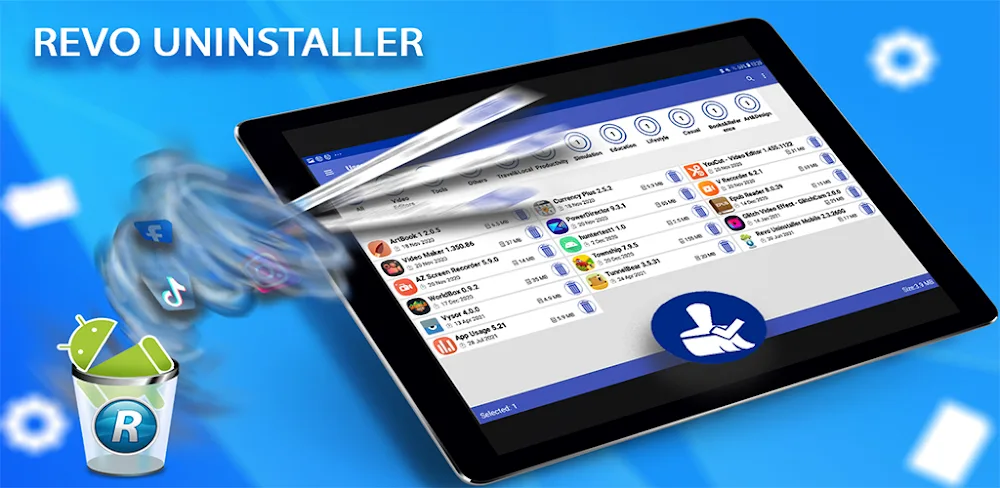
One of the standout features of Revo Uninstaller is its ability to efficiently remove unnecessary applications. The app's tools allow for a quick scan of the storage, making it simple to identify and delete leftover data from deleted apps. This feature is particularly useful for users who struggle to keep their app storage in check.
Thoroughly Scan for Leftovers
The app's scanning feature helps users detect and remove residual data that can slow down their device. This is a crucial aspect of maintaining a secure and efficient device experience. Regularly checking for leftover data ensures that users can enjoy seamless app performance, while also saving valuable storage space.
Quickly Delete Junk Data
Revo Uninstaller provides users with a straightforward way to remove junk data that can compromise their device's performance. By filtering and deleting unnecessary files, users can maintain a smooth and enjoyable experience on their device. The app's intuitive interface makes it easy to navigate and delete unwanted files.
Simplify App Management with Revo Uninstaller
Revo Uninstaller offers a range of features to help users manage their application system and backups more effectively.
Create and Manage App Backups
The app allows users to create backups of installed applications, including names, versions, and sizes. Users can easily check the status of their backups and manage them as needed. This feature is particularly useful for users who frequently update or reinstall apps.
Compare Device States with Backup Files
Revo Uninstaller enables users to compare their backup files with the current device status, making it easier to identify and manage any differences. This feature is a game-changer for users who want to keep their device organized and up-to-date.
Organize Apps into Categories with Ease
The app offers a user-friendly interface for categorizing apps, with smart filters for filtering and arranging over 60 different categories. Once organized, users can easily manage their apps and files. This feature is a time-saver for users who struggle to keep their app library in order.
What Works Well
Revo Uninstaller is a comprehensive tool that offers a range of features to help users streamline their device. The app's intuitive interface and efficient uninstallation process make it a breeze to remove unwanted apps and residual data. The app's backup and organization features are also a major plus, making it easy to manage and maintain a clutter-free device.
What Could Be Improved
While Revo Uninstaller is an excellent tool, there are a few areas where it could be improved. For example, the app's scanning feature can be quite slow at times, which can be frustrating for users who are in a hurry. Additionally, the app's backup feature could be more robust, allowing users to schedule automatic backups and restore their device to a previous state.
Conclusion
Revo Uninstaller is a powerful tool that offers a comprehensive solution for Android app removal and management. While it may not be perfect, the app's features and intuitive interface make it an essential tool for any Android user looking to streamline their device and maintain a clutter-free storage space.
Who Is This App For?
Revo Uninstaller is best suited for:
- Android users who struggle to keep their app storage in check
- Users who frequently update or reinstall apps and want to maintain a secure and efficient device experience
- Individuals who want to simplify app management and organization
- Users who value a clutter-free device and want to maintain a smooth and enjoyable experience
If you're looking for a reliable tool to help you manage your Android app system, Revo Uninstaller is definitely worth checking out.
Editor's Verdict
App Details
- App: Revo Uninstaller
- Category: Utility
- Version: 3.4.480G
- Price: Free
- Platform: Android
Quick Assessment
Revo Uninstaller is a utility application for Android devices that is free to download. Currently at version 3.4.480G, the app has received positive feedback from the community with an average rating of 4/5. We recommend downloading it directly from the official Google Play Store to ensure you get the latest and safest version.
Community Reviews
What users are saying about Revo Uninstaller
Feb 10, 2026
This app has a lot of great features, but I think it would benefit from a more detailed history log for uninstalled apps. Currently, it's a bit hard to keep track of what was removed. Overall, I'd recommend this to anyone looking for a feature-rich uninstaller.
Feb 6, 2026
I've been using this uninstaller app for a while now, and I have to say, it's one of the best I've tried. The fact that I can customize the 'Modules' feature to remove specific items is amazing. One thing I wish they had, though, is a feature to schedule automatic cleanups.
Dec 26, 2025
Love the advanced uninstaller feature in Revo Uninstaller v3.4.480G, it's so much faster than the standard Android uninstaller. The UI is clean and easy to navigate. Great job, team!
Dec 13, 2025
This app has been a lifesaver for me, I've managed to free up so much space on my phone thanks to the forced uninstall feature. However, I do wish the app had a feature to prevent certain apps from being uninstalled by accident. The current UI is fine, but I think it could use a bit more organization.
Nov 26, 2025
This app didn't do much for me - the interface looked cluttered, and the features were somewhat confusing. Maybe someone could explain the 'Auto Start Manager' to me again? Sorry, but I won't be keeping this app on my device.
Nov 12, 2025
Revo Uninstaller v3.4.480G's UI could be more modern and visually appealing. It feels like an older design that hasn't been updated in a while. Still, the functionality is solid, and I appreciate the option to delete leftovers after uninstalling. Maybe some design tweaks could be in order?
Nov 5, 2025
I've tried other uninstaller apps before but Revo Uninstaller v3.4.480G has been the most reliable one so far. The real-time monitoring feature is particularly useful for me, as I can see exactly what's installed and what's not. One minor suggestion I'd like to make is to add more languages to the app.
Sep 18, 2025
I downloaded this app thinking it would help me delete data completely after uninstalling apps, but the 'Hunter mode' feature didn't do as well as I hoped it would. The interface is also not the most intuitive one I've used. Maybe improve the instructions provided when first using the app?
Reviews reflect personal user opinions and experiences.
Frequently Asked Questions
You May Also Like
Similar utility apps you might enjoy