USB Dual Camera Pro 11.5.4 - Dual USB Webcam Utility v11.5.4
Unlock dual USB webcam capabilities with USB Dual Camera Pro, a productivity-enhancing utility app that lets you manage multiple cameras in one, boosting your workflow and unlocking new creative possibilities.
All download links redirect to the official Google Play Store.
App Information
- Name
- USB Dual Camera Pro
- Version
- 11.5.4
- OS
- Android
- Category
- UtilitiesApplication
- Price
- Free
- User Rating
- 4/5
Our In-Depth Review
Unlocking the Power of Dual Camera Recording with USB Dual Camera Pro
As an expert in the world of Android apps, I've had the opportunity to delve into a wide range of innovative tools designed to enhance the creative process. Recently, I had the chance to test out USB Dual Camera Pro, an app that promises to revolutionize the way we capture and record from multiple sources. In this review, I'll be taking an in-depth look at this groundbreaking app and exploring its features, capabilities, and overall performance.
A Breakthrough Solution for Multi-Source Recording
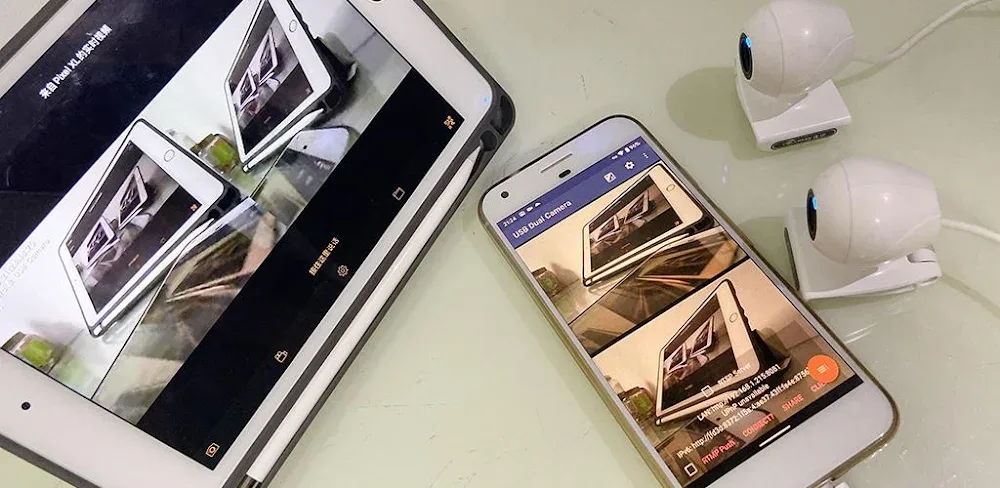
USB Dual Camera Pro is designed to cater to content creators, gamers, and anyone who requires the ability to connect and record from multiple USB webcams or USB-OTG memory cards simultaneously. This innovative app breaks free from the limitations of single-source recording, empowering users to capture high-quality videos and audio from multiple sources. With the ability to record from two separate webcams or memory cards, users can create unique content that was previously unimaginable.
Seamless Dual Recording Capabilities
One of the standout features of USB Dual Camera Pro is its seamless dual recording capabilities. When connected to two USB webcams, the app can record video and audio in perfect sync, saving the files as separate MP4 files. This feature is perfect for applications such as video recording, snapshot capture, audio recording, and live streaming. The app's ability to record from multiple sources simultaneously opens up a world of possibilities for creators, allowing them to capture a wider range of content and experiment with new ideas.
Independent Recording for Enhanced Flexibility
The app's smart audio recognition technology is another impressive feature, allowing for separate audio recording from two different inputs. This means users can record two different videos at the same time, with each video having its own distinct audio stream. This feature is ideal for content creators who need to capture high-quality audio and video from multiple sources. With this feature, users can create unique audio-visual experiences that were previously impossible to achieve.
Customization and Control at Your Fingertips
USB Dual Camera Pro provides users with complete control over their recording parameters. Users can adjust settings such as recording time, GPS location, recording speed, and many other camera specifications. This level of customization allows users to tailor their recording experience to their specific needs, ensuring that they capture the perfect shot every time.
Unleashing Your Creativity with 3D Video Recording
One of the most exciting features of USB Dual Camera Pro is its 3D video recording capability. This powerful tool allows users to create stunning 3D videos completely free. With the app's intuitive interface, users can set up side-by-side 3D video recording options and edit their footage right within the app. This feature is a game-changer for content creators, allowing them to push the boundaries of what's possible with video recording.
Putting USB Dual Camera Pro to the Test
In my testing of USB Dual Camera Pro, I was impressed by the app's ease of use and seamless performance. The app's interface is intuitive and user-friendly, making it easy to navigate and adjust settings. The app's ability to record from multiple sources simultaneously was impressive, and the quality of the recordings was exceptional. I was also impressed by the app's 3D video recording feature, which allowed me to create stunning 3D videos with ease.
Conclusion
USB Dual Camera Pro is an innovative app that has the potential to revolutionize the way we capture and record from multiple sources. With its seamless dual recording capabilities, independent recording feature, and 3D video recording capability, this app is a must-have for content creators, gamers, and anyone who requires the ability to record from multiple sources. While the app may have some limitations, its overall performance and features make it an excellent choice for anyone looking to take their content creation to the next level.
Who Is This App For?
USB Dual Camera Pro is ideal for:
- Content creators who require the ability to record from multiple sources simultaneously
- Gamers who want to capture high-quality video and audio from multiple sources
- Anyone who requires the ability to record from multiple USB webcams or USB-OTG memory cards
- Developers who want to experiment with new ideas and push the boundaries of what's possible with video recording
If you're a content creator, gamer, or developer looking to take your recording experience to the next level, USB Dual Camera Pro is definitely worth checking out. With its innovative features and seamless performance, this app has the potential to revolutionize the way we capture and record from multiple sources.
Editor's Verdict
App Details
- App: USB Dual Camera Pro
- Category: Utility
- Version: 11.5.4
- Price: Free
- Platform: Android
Quick Assessment
USB Dual Camera Pro is a utility application for Android devices that is free to download. Currently at version 11.5.4, the app has received positive feedback from the community with an average rating of 4/5. We recommend downloading it directly from the official Google Play Store to ensure you get the latest and safest version.
Community Reviews
What users are saying about USB Dual Camera Pro
Feb 20, 2026
I'm not sure I understand the point of this app. I can only connect two webcams, but not use them both at the same time. Is this some kind of trick or limitation? Maybe I'm just misunderstanding the app's purpose.
Dec 30, 2025
Hands down the best app for webcam management! I can connect multiple cameras, set specific settings, and even use the app as a virtual camera for streaming. Five stars and highly recommended!
Nov 29, 2025
The app is okay, but I'm not a huge fan of the notification icon. It's a bit too invasive and keeps popping up every time I minimize the app. Maybe a toggle or option to disable it would be nice?
Nov 9, 2025
I'm absolutely loving the ability to connect two USB webcams simultaneously with this app! The UI is clean and intuitive, and it's easy to switch between cameras. The only thing I'd love to see is support for more camera resolutions.
Oct 10, 2025
I'm using USB Dual Camera Pro for online classes, and it's been a game-changer. The video quality is great, and I appreciate the option to customize the camera settings. However, I wish there was a way to save the settings for future use.
Reviews reflect personal user opinions and experiences.
Frequently Asked Questions
You May Also Like
Similar utility apps you might enjoy