VIP Notes v9.9.81 - Professional Notes App
Get the best notes experience with VIP Notes, featuring rich text editing, password protection, and cloud syncing, perfect for professionals and note-takers alike.
All download links redirect to the official Google Play Store.
App Information
- Name
- VIP Notes
- Version
- 9.9.81
- OS
- Android
- Category
- UtilitiesApplication
- Price
- Free
- User Rating
- 4.1/5
Our In-Depth Review
Secure and Organized Note-Taking with VIP Notes
Enhancing Productivity with Robust Security Features
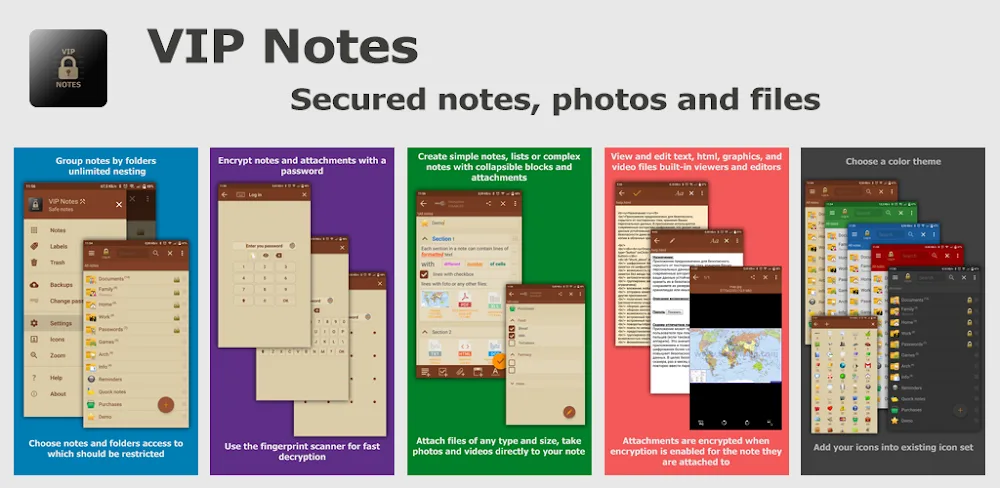
As a note-taking app, VIP Notes stands out from the crowd with its unwavering focus on security. With multiple layers of protection, users can rest assured that their sensitive information is safeguarded. But is this app's emphasis on security enough to set it apart in a crowded market? In this review, we'll dive into the features that make VIP Notes a compelling choice for those seeking a secure and organized note-taking experience.
Top-Tier Encryption and Data Protection
VIP Notes takes security seriously, and it shows in the app's top-tier encryption. This advanced security measure continuously protects all related data until it's unlocked, giving users peace of mind when creating and storing sensitive information. The encryption is robust, and users can rest assured that their notes and attached files are secure.
However, it's worth noting that the app's encryption is not its only security feature. Multiple login options are available, creating multiple layers of security. Users can also create complex passwords that change based on the characteristics of their chosen device. This adds an extra layer of protection, making it difficult for unauthorized users to access sensitive data.
Fake Space Protection and Password Security
One of the standout features of VIP Notes is its fake space protection. When users input an incorrect password, the app creates a fake space, making it easy to identify and prevent unauthorized access to sensitive data. This is a clever feature that adds an extra layer of security to the app's already robust encryption.
Streamlining Note Organization and Management
While VIP Notes excels in security, it also offers a professional-grade note-taking experience with enhanced organization features. Users can quickly approach different ways of note-taking and add features according to their preferences. This flexibility is a major draw for users who value customization and organization.
Rich Text Formatting and Customization
The app allows users to format notes with rich text, enabling them to try various layouts until they find the most suitable one. This level of customization is a major plus for users who value flexibility in their note-taking experience.
Labels, Reminders, and Efficient Organization
Users can add labels and reminders to notes, making it easy to optimize organization and search for specific notes later. This feature is a major time-saver, and it's a testament to the app's focus on user experience.
Widgets and Shortcuts for Convenient Access
VIP Notes enables users to optimize shortcuts for frequently accessed elements, allowing them to access notes directly from the home screen. This feature is a major convenience, and it's a testament to the app's focus on user experience.
Conclusion
VIP Notes is a compelling choice for users seeking a secure and organized note-taking experience. With its top-tier encryption, multiple login options, and fake space protection, the app offers a robust security feature set. Meanwhile, its flexible organization features, rich text formatting, and customizable layout options make it a pleasure to use. While the app may not be perfect, its strengths far outweigh its weaknesses.
Who Is This App For?
VIP Notes is ideal for users who value security and organization in their note-taking experience. This includes professionals who need to store sensitive information, students who value customization and flexibility, and individuals who want a secure and organized note-taking experience. The app is also a great choice for users who use multiple devices and need a seamless experience across platforms.
Editor's Verdict
App Details
- App: VIP Notes
- Category: Utility
- Version: 9.9.81
- Price: Free
- Platform: Android
Quick Assessment
VIP Notes is a utility application for Android devices that is free to download. Currently at version 9.9.81, the app has received positive feedback from the community with an average rating of 4.1/5. We recommend downloading it directly from the official Google Play Store to ensure you get the latest and safest version.
Community Reviews
What users are saying about VIP Notes
Feb 19, 2026
I appreciate the collaboration feature in VIP Notes, allowing multiple users to edit notes simultaneously. However, I wish there was a more efficient way to manage shared notes, such as assigning roles or permissions. Despite this, it's an excellent tool for team projects. 5/5
Jan 28, 2026
The search function in VIP Notes is incredibly efficient, allowing me to quickly find specific notes among hundreds. I can also export my notes to PDF with ease. Overall, it's an excellent choice for a personal notes app. 5/5
Nov 16, 2025
The VIP Notes v9.9.81 MOD APK offers a wide range of fonts, but I wish they added more customization options for the UI. I find the font selection a bit limited for a professional notes app. Still, it's a great tool for jotting down ideas and to-do lists. 4/5
Nov 12, 2025
I love how VIP Notes syncs with Google Drive seamlessly. However, I've encountered a few instances where the notes didn't sync properly after restarting the app. Maybe it's a minor bug, but it's something to look into. 3/5
Oct 27, 2025
I've encountered some issues with the app crashing when trying to open an extremely long note. Perhaps it's a bug specific to my device, but it's something the developers should look into. That being said, VIP Notes is generally a great app with many useful features. 3/5
Oct 21, 2025
I'm not a huge fan of the VIP Notes interface, but it gets the job done. The app feels a bit cluttered, and I wish there was an option to hide the bottom navigation bar. Nevertheless, it's a solid choice for those looking for basic note-taking features. 4/5
Sep 20, 2025
I've been using VIP Notes for months and I'm really impressed with the encryption feature. It gives me peace of mind when storing sensitive notes. The app is easy to use and the password protection works flawlessly. 5/5
Reviews reflect personal user opinions and experiences.
Frequently Asked Questions
You May Also Like
Similar utility apps you might enjoy