WiFi Monitor Pro 2.16.2 - WiFi Analyzer & Network Speed Tracker
WiFi Monitor Pro is a comprehensive utility app that analyzes WiFi signals, tracks network speed, and monitors WiFi usage with detailed insights, helping you optimize your network performance and stay connected.
All download links redirect to the official Google Play Store.
App Information
- Name
- WiFi Monitor Pro
- Version
- 2.16.2
- OS
- Android
- Category
- UtilitiesApplication
- Price
- Free
- User Rating
- 3.9/5
Our In-Depth Review
WiFi Monitor Pro: A Comprehensive Tool for Optimizing Your Wi-Fi Performance
Unlocking Optimal WiFi Performance
WiFi Monitor Pro is an advanced app designed to help users optimize their WiFi experience by analyzing and managing nearby WiFi signals. This in-depth review will delve into the app's features, highlighting its strengths and weaknesses, and determining who it's best suited for.
In-Depth Network Analysis and Management
One of the standout features of WiFi Monitor Pro is its comprehensive suite of tools for analyzing and managing nearby WiFi signals. The app's network analysis capabilities allow users to prioritize signals and optimize their WiFi experience with specific routers or nearby signals. With a focus on detail and customization, this app empowers users to make informed decisions about their wireless network connections.
Network Properties and Signal Strength
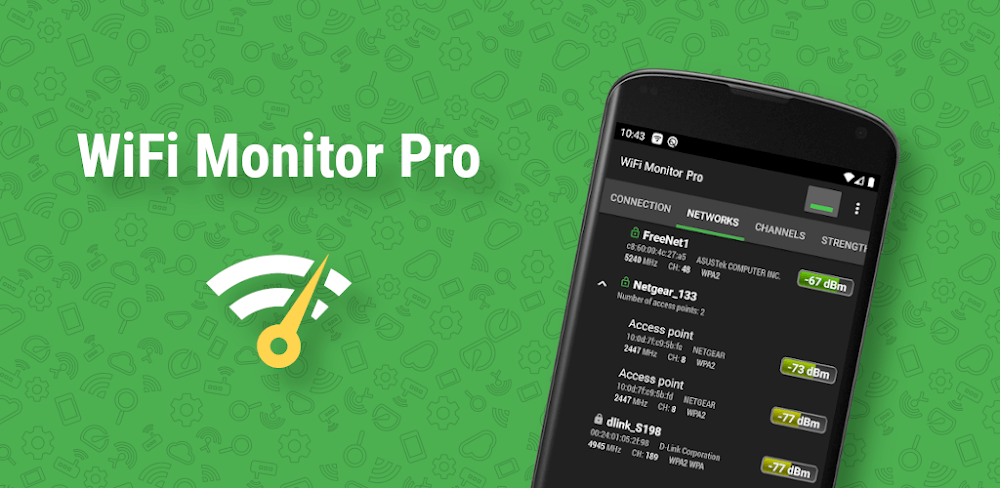
By selecting the Networks option, users can delve into the properties of surrounding WiFi hotspots, including network type, manufacturer, signal strength, and security protocol. The app groups access points by Service Set Identifier (SSID) for easier analysis and comparison. Once detected, users can access and examine network properties in detail to ensure the best possible connection performance.
Channel Scanning and Device Management
In addition to network analysis, WiFi Monitor Pro also features channel scanning and device management capabilities. The Channels tab displays the signal strength of active hotspots across various frequencies, highlighting the potential for signal degradation when multiple routers use the same frequency. This feature is particularly useful for identifying and mitigating interference from neighboring networks.
The Scanning tab facilitates device discovery and lists connected devices and their settings, enabling users to identify and disable unauthorized access points through their router's configurations. This level of control is essential for maintaining a secure and private network.
Signal Comparison and Performance Optimization
WiFi Monitor Pro's Strength chart allows users to compare multiple WiFi signals based on various parameters, while the Speed graph provides valuable insights into network performance. By monitoring signal strength and evolution over time, users can ensure a more reliable and stable wireless connection, ideal for streaming, gaming, and other online activities.
Who Is This App For?
WiFi Monitor Pro is an excellent tool for anyone looking to optimize their WiFi performance, particularly:
- Home network administrators: Those responsible for managing their home network will appreciate the app's comprehensive network analysis and management capabilities.
- Business owners: Small business owners with multiple devices and networks will benefit from the app's ability to scan for nearby networks, identify potential interference, and optimize their network performance.
- Tech enthusiasts: Anyone interested in Wi-Fi technology and performance optimization will appreciate the app's depth and feature set.
Overall, WiFi Monitor Pro is a valuable tool for anyone looking to optimize their Wi-Fi performance and ensure a reliable and stable connection. While it may require some technical knowledge to fully utilize its features, the app's comprehensive suite of tools makes it an essential addition to any network administrator's toolkit.
Editor's Verdict
App Details
- App: WiFi Monitor Pro
- Category: Utility
- Version: 2.16.2
- Price: Free
- Platform: Android
Quick Assessment
WiFi Monitor Pro is a utility application for Android devices that is free to download. Currently at version 2.16.2, the app continues to receive updates from the developer. We recommend downloading it directly from the official Google Play Store to ensure you get the latest and safest version.
Community Reviews
What users are saying about WiFi Monitor Pro
Mar 6, 2026
I loved how easy it is to use WiFi Monitor Pro to track my network speed and monitor WiFi usage. The UI is clean and intuitive, and the graph view provides detailed insights into my data usage. 5/5
Feb 23, 2026
I'm really impressed with the network speed tracking feature. However, I wish it allowed for multiple devices to be tracked simultaneously, as I often use my tablet and laptop at the same time. 4/5
Feb 11, 2026
Unfortunately, the app kept crashing on me whenever I tried to scan for new WiFi networks. I've tried restarting my phone and reinstalling the app, but the issue persists. 2/5
Jan 11, 2026
I'm a little disappointed with the lack of options for customizing the WiFi network scanning intervals. The default interval is fine for casual users, but for heavy users like myself, it's a bit too long. 3/5
Jan 2, 2026
This app is a must-have for anyone who wants to optimize their WiFi network! The WiFi analyzer feature helped me identify the channels with the least interference, and now my internet is way faster! 5/5
Dec 16, 2025
I'm not sure if I'd recommend WiFi Monitor Pro to beginners, as the UI can be a bit overwhelming at first. However, once you get used to it, the app is super informative and easy to use. 3/5
Oct 24, 2025
I've been using WiFi Monitor Pro for a few weeks now, and I'm still finding new features to love. One thing I'd like to see added is a widget for the home screen, so I can quickly check my WiFi status. 4/5
Reviews reflect personal user opinions and experiences.
Frequently Asked Questions
You May Also Like
Similar utility apps you might enjoy